SharePoint Online: The Questions People Actually Ask
Straight answers to the recurring SharePoint questions, including the ones where the honest answer is that the popular advice is wrong.
 Rajiv KumarJanuary 28, 20266 min read
A working reference for the SharePoint Online questions that come up over and over — storage, the list view threshold, versioning, deletion, permissions and sharing — with the reasoning behind each answer rather than just the answer.
These are the SharePoint Online questions that come back regardless of organisation. Each answer includes the reasoning, because the reasoning is what lets you handle the variant of the question you get next week.
Structure and limits
What is the list view threshold, and why can I not just raise it?
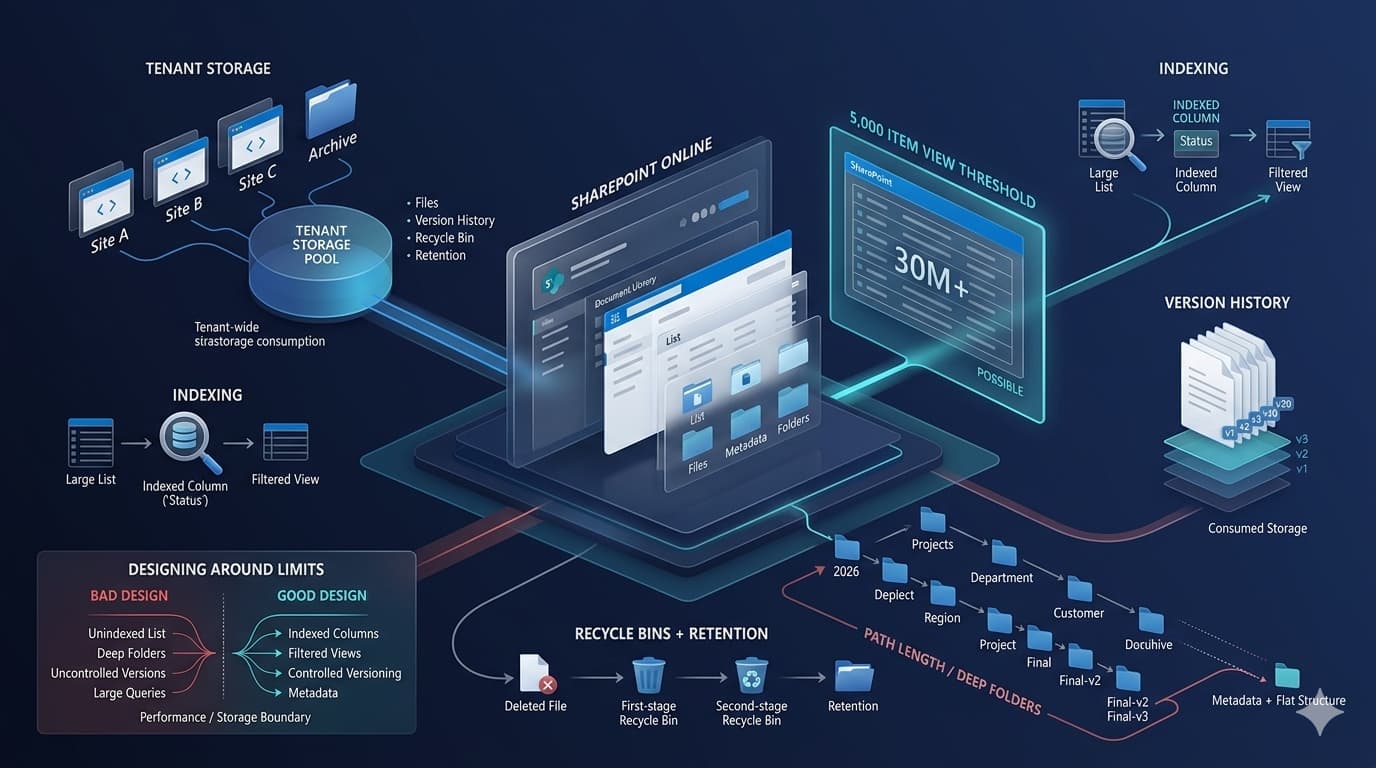
SharePoint limits how many list items a single database operation may touch. Beyond that limit, an operation that would lock too many rows is refused rather than allowed to degrade the service for everyone else. It is a multi-tenant fairness mechanism, not a storage limit — a list can hold far more items than the threshold.
You cannot raise it in SharePoint Online. What you can do is make queries not hit it: index the columns you filter on, add a default view filter so no view ever asks for everything, and use folders or metadata to partition what a query touches. A list of a million items performs perfectly well if nothing ever asks for a million items at once.
Should I use folders or metadata?
The received wisdom is metadata, always. The honest answer is both, for different reasons.
Metadata is better for finding things: one item can carry several values, views can group and filter on them, and it does not force one hierarchy on everyone. Folders are better for two specific jobs — they partition large libraries so views stay under the threshold, and they carry permissions, which is a real requirement when a subset of documents needs different access.
Use metadata for classification and folders for scale and permission boundaries. Deep nested folders replicating a network drive are the thing to avoid, not folders themselves.
Site collections, subsites or hub sites?
Modern guidance is flat: separate site collections, connected by a hub, rather than subsites. Subsites share the storage, permissions inheritance and lifecycle of their parent, which makes them hard to move, hard to secure independently and hard to retire. Hubs give you shared navigation, search scope and branding without the coupling.
Existing subsites are not an emergency. Do not create new ones.
Versions, deletion and recovery
Where do old versions live, and do they cost storage?
Every version is stored and every version counts toward the site's storage. A library with versioning set to a high limit, holding large files that are edited often, consumes considerably more than the size of the current files.
Setting a sensible version limit is one of the highest-value settings changes available in a large tenant, and it costs nothing to make.
What actually happens when someone deletes a file?
It goes to the site recycle bin. When removed from there, or when its retention expires, it goes to the second-stage recycle bin, which a site collection administrator can reach. After that stage expires it is gone.
Retention policies change this: an item under retention is preserved even when a user deletes it, in a location users cannot reach. That is the point of retention, and it is why "the user deleted it" and "it is gone" are different statements.
Can I restore a whole library to a point in time?
Yes. Restore-this-library rolls a document library back to a previous point, and it is the correct first response to bulk corruption or a ransomware event affecting one library. Know that it exists before you need it, because discovering it during an incident wastes the hour when it would have been most useful.
Permissions and sharing
Why can someone still open a file after I removed them?
Almost always one of four things: they hold a sharing link that grants access independently of group membership, they are in another group that also has access, the item has broken inheritance with a direct grant, or a cached token has not yet expired.
Check the item's own sharing panel first — it lists links as well as direct grants. Removing someone from a group does not revoke a link they already have.
What does "Anyone in the organisation with the link" really mean?
Exactly what it says: every internal user can open the item if they have the URL, whether or not they have any permission on the site. Links are shareable, forwardable and long-lived. It is the single largest source of unintended internal access in most tenants.
Change the default link type at tenant level to a specific-people link. It stops the problem growing while you deal with what already exists.
Should I use unique permissions on items?
Sparingly. Every break is an exception to the model, invisible in ordinary use, and they accumulate. Large numbers of item-level breaks also affect performance. If a set of documents needs different access, put them in their own library or their own site — a permission boundary that is visible in the structure is one people can reason about.
Search and content
Why does search not find a document I can see?
Usually one of: it has not been indexed yet, its library or site is excluded from search results in settings, the file type is not indexed, or the content is an image-only scan with no text layer. Check the site's search settings before assuming an index problem.
Can I stop a site appearing in search?
Yes, at site and library level. Note that this changes discoverability, not permissions — someone with the URL and access still opens it. Search exclusion is not a security control.
Common mistakes
- Treating the list view threshold as a size limit. It limits a single operation, not the list.
- Unlimited versioning on large media libraries. Storage disappears quietly.
- Using search exclusion as security. It hides, it does not protect.
- Recreating the file server as nested folders. Path lengths, sync problems and no useful views.
- Assuming removing a group member revokes access. Sharing links survive.
- Creating subsites out of habit. They are the harder shape to change later.
Frequently asked questions
How many items can a list hold?
Far more than the view threshold. What matters is whether any single query touches more rows than the limit permits — which is a design question about indexes and view filters, not about the total.
Does OneDrive sync work with large libraries?
It works better with fewer, larger files than with very many small ones, and Files On-Demand avoids downloading everything. Syncing a library with hundreds of thousands of items is where problems begin.
Is a Teams team the same as a SharePoint site?
Every team has a SharePoint site behind it, holding its files. The reverse is not true: a SharePoint site can exist without a team. Files in a Teams channel live in a folder in that site.
How do I find out who has access to something?
The sharing panel for the item, then the site's permissions, then any groups involved — including nested membership. Tenant-level reporting is what makes this tractable across many sites; item by item does not scale.
Where do current numbers for limits live?
Published service limits change. Use the Microsoft service description and limits documentation for any figure you are going to design against, rather than a number quoted in an article — including this one.
The pattern behind the answers
Most of these questions have the same shape: something behaves as though it were a security or storage rule when it is really a performance or discoverability mechanism, or the reverse. Knowing which of the two you are dealing with answers most SharePoint questions before you look anything up.