
Power Platform DLP: Governing Connector Combinations
DLP policies do not inspect data. They decide which connectors may be used together — and that distinction shapes every policy decision.
 Rajiv KumarApril 17, 20244 min read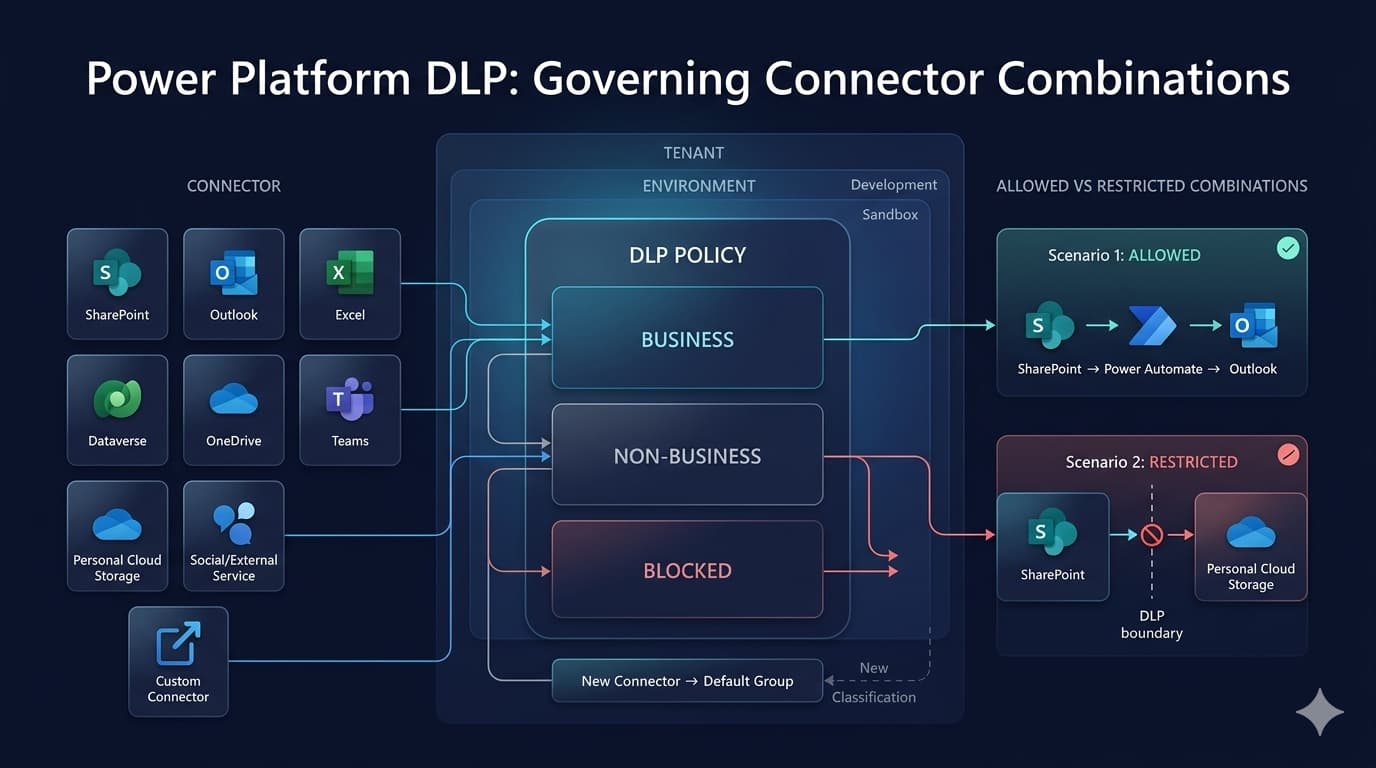
Power Platform DLP sorts connectors into Business, Non-business and Blocked, then prevents combining across groups. Here is how to build a policy people follow rather than route around.
Power Platform data loss prevention policies exist to answer one question: which connectors may exchange data with which other connectors. They are not about who can build apps, and they do not inspect data. They govern combinations.
Understanding that distinction is what stops DLP being either uselessly permissive or so restrictive that people route around it.
How the model works
A DLP policy sorts every connector into one of three groups:
| Group | Meaning |
|---|---|
| Business | Connectors holding organisational data |
| Non-business | Connectors that do not |
| Blocked | Connectors that cannot be used at all |
The single rule that follows: a connector in one group cannot be combined with a connector in another group inside the same app or flow.
So a flow using SharePoint and Outlook works when both are Business. A flow using SharePoint and a personal cloud storage connector fails when they sit in different groups. The block is on the combination, not on either connector alone.
The labels carry no inherent meaning. "Business" and "Non-business" are just two boxes; what matters is which connectors you cannot bridge.
Tenant and environment scope
Policies apply at two levels, and both matter.
Tenant-level policies apply broadly, with the option to include or exclude specific environments. They are the right place for genuine organisational rules — connectors nobody should use, and combinations nobody should build.
Environment-level policies apply to a single environment, and are how you give a development environment more freedom than production, or lock a sensitive environment down further.
When policies overlap, the effect is cumulative in the restrictive direction: a connector blocked by any applicable policy is blocked. You cannot loosen a tenant policy from an environment policy, which is the correct design but does mean the tenant policy needs care — it is the ceiling.
Getting the default group right
New connectors appear regularly, and a policy has to decide where an unclassified connector lands.
Setting the default to Non-business is the safer choice: a new connector cannot be combined with organisational data until someone deliberately classifies it. Defaulting to Business means every new connector is automatically trusted alongside your data.
This has a real cost — new connectors will not work until classified, and someone must own that. Name that owner. A policy nobody maintains becomes a policy people work around.
Building a policy that people can live with
- Start by observing. Before restricting anything, look at what is actually in use. Blocking a connector that a live business process depends on breaks that process.
- Block the genuinely unacceptable first. A short Blocked list — consumer file sharing, personal social accounts — is easier to justify and defend than an elaborate classification.
- Classify the connectors actually in use. Do not attempt the full catalogue. Classify what your organisation uses and let the default handle the rest.
- Give development room. A development environment with a looser policy lets people experiment without weakening production.
- Communicate before enforcing. DLP failures produce messages that do not explain the policy. Makers need to know the policy exists and who to ask.
- Review on a schedule. Connectors are added continuously. An unreviewed policy drifts out of usefulness.
Common mistakes and better practice
- Treating DLP as data inspection. It governs connector combinations. It does not read content, and it will not stop someone copying data manually.
- Rolling out tenant-wide with no warning. Existing apps and flows stop, often silently. Inventory first.
- Defaulting new connectors to Business. Every new connector then gets access to organisational data by default.
- Building one enormous policy. Separate policies per environment type are easier to reason about and change.
- Forgetting custom connectors. They are classified too, and are easy to overlook when they were built by a project team.
- No exception route. If there is no way to request a legitimate exception, people build workarounds outside the platform, which is strictly worse.
- Assuming DLP covers everything. It governs Power Platform connectors. It is one control among several, not a complete boundary.
Troubleshooting
| Symptom | Cause | Resolution |
|---|---|---|
| Flow suspended after a policy change | It combines connectors now in different groups | Rework the flow, or reclassify one connector after review |
| App will not save, citing DLP | Two connectors in different groups on one app | Remove one, or move the app to an environment with a different policy |
| New connector unavailable to makers | Default group placed it in Non-business | Classify it deliberately |
| Policy appears not to apply | Environment excluded from the tenant policy scope | Check the scope; environment exclusions are easy to forget |
| Custom connector blocked unexpectedly | Unclassified, so it took the default group | Classify custom connectors explicitly |
| Works in development, blocked in production | Different policies per environment | Expected; validate against the production policy before release |
Frequently asked questions
Does DLP inspect the data being moved?
No. It controls which connectors can be combined. Content-level protection comes from sensitivity labels and Microsoft Purview.
What happens to existing apps when a policy is applied?
Non-compliant apps and flows stop working. This is why inventory precedes enforcement.
Can an environment policy relax a tenant policy?
No. Restrictions accumulate. The tenant policy is the ceiling.
Are custom connectors covered?
Yes, and they can be classified individually. Unclassified ones take the default group.
Should development have the same policy as production?
Usually not. A looser development policy allows experimentation, provided nothing reaches production without being validated against the production policy.
Policy that survives contact with makers
The DLP policies that work are the ones people understand. A short blocked list with a clear rationale gets respected. A sprawling classification nobody can explain gets circumvented, and circumvention usually means data moving through channels with no governance at all.
Start restrictive on the few things that genuinely matter, be permissive elsewhere, and make sure there is a named person who can answer "why can I not use this connector?" — because that question will be asked in the first week.