
Azure AI Foundry: Getting From Prototype to Production
The prototype is the easy part. What separates a demo from a service is evaluation, deployment shape, content safety and knowing what it costs.
 Rajiv KumarAugust 5, 202610 min read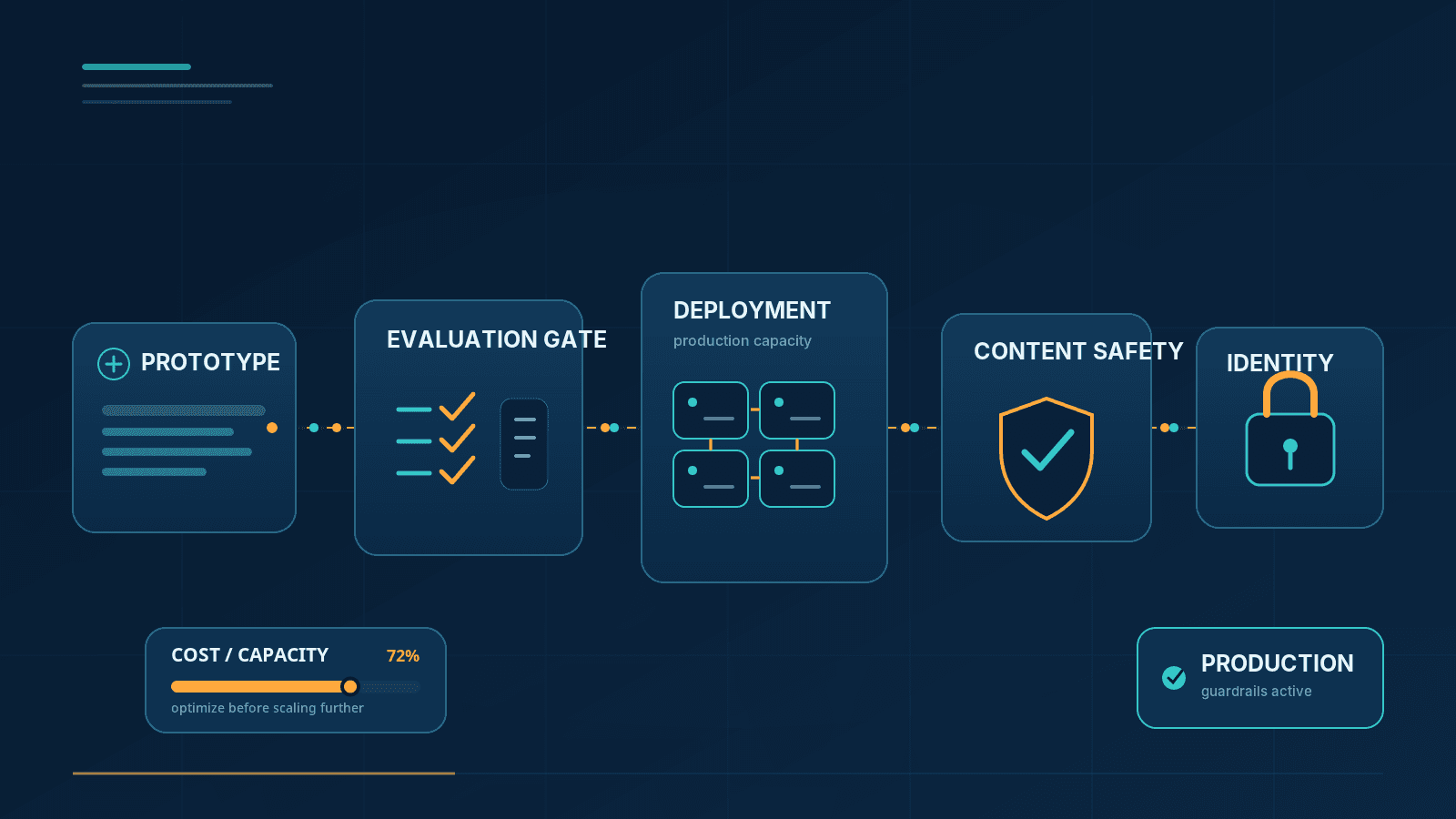
A working prompt in a playground is not a system. Production needs a way to tell whether a change helped, a deployment model that matches the traffic, content filtering you have configured deliberately, and observability into what is being spent.
A working prompt in a playground is not a system. Getting a model to do something impressive there takes an hour. Getting it to do that reliably, for a thousand people, with a cost you can predict and a failure mode you can explain, is a different project — and most of that project is not prompt engineering.
One naming note before anything else, because it trips people up mid-search: Azure AI Foundry was renamed Microsoft Foundry at Ignite 2025, effective in Microsoft's product terms from January 1, 2026. It's the same platform — model catalog, deployments, evaluation, content safety, the works — under a name that drops "Azure" because Microsoft now treats agents as first-class products rather than a feature of the cloud. Azure OpenAI Service didn't go anywhere either; it's one provider inside what's now called Microsoft Foundry Models, alongside Meta, Mistral, DeepSeek, Cohere and others in the catalog. You'll still see both names in documentation, URLs, and older blog posts (including, until this rewrite, this one) for a while yet. This piece uses the current name and flags it once so you're not left wondering if you're on the wrong page.
With that settled: what follows is the work between a functioning prototype and a service people depend on, in the order it tends to bite you.
Evaluation comes first, not last
Without evaluation you cannot tell whether a change helped. That sounds obvious and is routinely skipped, because with generative systems every change feels like it helped — you check the three examples you had in mind, they look better, you ship.
The minimum viable evaluation is a fixed set of inputs with expected characteristics, run on every change:
Real inputs. Pulled from the queue you're automating, not written by the team building it.
Adversarial inputs. Ambiguous, out of scope, hostile, in another language.
Inputs where the correct behavior is refusal. These are the ones a prompt change silently breaks.
Microsoft Foundry's evaluation SDK ships built-in evaluators across several families rather than one generic "quality" score, and picking the right family matters more than people expect:
Category | Examples | Use it for |
|---|---|---|
General purpose | Coherence, Fluency | Any generated text |
Textual similarity | Similarity, F1, BLEU, ROUGE, METEOR | Translation, summarization against a reference answer |
RAG | Retrieval, Groundedness, Groundedness Pro, Relevance, Response Completeness | Anything answering from retrieved context |
Risk and safety | Hate/Unfairness, Sexual, Violence, Self-Harm, Protected Material, Indirect Attack (XPIA) | Every application, regardless of domain |
Agent | Task Adherence, Tool Call Accuracy, Tool Selection, Intent Resolution | Multi-step agents that call tools |
A RAG application should be running Retrieval, Groundedness and Relevance together, not Groundedness alone — a response can be perfectly grounded in the wrong document, and Relevance is what catches that. Several of the newer additions (Response Completeness, Task Adherence, Customer Satisfaction) are still in preview, which in Microsoft's own terms means no SLA and not recommended as the sole gate for a production release; treat them as extra signal, not the thing you block a deploy on until they graduate.
Tip
Evaluators support two levels —
turn(a single response) andconversation(the whole exchange) — and every evaluator in one run has to use the same level. Decide which one your product actually needs before you wire up a pipeline, because mixing them isn't an option Foundry will let you paper over.
The rule worth adopting regardless of which evaluators you pick: no prompt change ships without a before-and-after on the evaluation set. It converts opinion into a number, and it catches the regressions that only show up in cases nobody on the team was thinking about. Foundry's observability tooling also supports continuous, sampled evaluation against live traffic — worth turning on once you're past the prototype stage, because the failure modes production traffic finds are rarely the ones your test set anticipated.
Choosing a deployment type is not a rounding error
Foundry Models offers more deployment shapes than most people realize, and picking one carelessly produces either a throttled service or a bill nobody signed off on.
Shape | Billing | Suits | Watch out for |
|---|---|---|---|
Global Standard | Pay-per-token | Most workloads; launches first for new models, highest quota | Latency variance at high volume |
Data Zone Standard | Pay-per-token | Same as above, with inference held inside a US, EU or APAC data zone | Slightly lower quota than Global |
Standard (regional) | Pay-per-token | Geography-restricted compliance needs | Limited model availability, no guaranteed launch date |
Provisioned (Global / Data Zone / Regional) | Per-PTU, hourly or reserved | Steady, latency-sensitive production traffic | Paid for whether used or not; needs a sizing exercise first |
Batch (Global / Data Zone) | ~50% discount, 24-hour target turnaround | Large offline jobs, no interactive user | No real-time SLA — not for anything a person is waiting on |
Developer | Pay-per-token, 24-hour lifetime | Evaluating a fine-tuned model before committing | No SLA, no data-residency guarantee, auto-deleted |
Two distinctions worth being deliberate about. First, "data at rest" and "where inference actually runs" are different guarantees: Global deployments may route a request to any Azure region for processing, Data Zone deployments keep it inside the declared zone, and Standard/Regional Provisioned keep it inside the specified geography. If your compliance answer depends on where a prompt is processed rather than where it's stored, that's the row to read carefully, not the pricing column.
Second, if you're weighing Provisioned Throughput, don't size it from a gut estimate. Foundry's capacity calculator takes your expected requests per minute, average input/output token sizes, and prompt-cache hit rate, and converts that into a PTU count — the output-to-input ratio matters here because output tokens cost more capacity than input tokens per model. Reservations (1-month or 1-year, at a discount over hourly billing) are purchased separately from the deployment itself, and having a reservation doesn't guarantee capacity is available in a region — create the deployment first to confirm capacity exists, then commit.
Rate limits apply regardless of shape, and they're expressed as both tokens-per-minute and requests-per-minute — the ratio between them is set per model version, so a workload with many small calls can hit the request ceiling while nowhere near its token ceiling. An exceeded limit returns HTTP 429, and it will happen under normal bursty traffic, not just misuse. Every client needs retry logic with backoff, and Foundry's own guidance is explicit about ramping load up gradually rather than firing a fully-scaled workload at a fresh deployment on day one — treating a 429 as a hard failure turns a brief spike into an outage that didn't need to happen.
Content safety is configuration, not a checkbox
Content filtering runs on both prompts and completions, scored across four categories — hate, sexual, violence, self-harm — at four severity levels (safe, low, medium, high). The default threshold blocks medium and high while allowing low; it's a reasonable middle and unlikely to be exactly right for your application.
Example
A clinical documentation assistant will trip the self-harm and violence categories on entirely legitimate medical language — a mention of a patient's injury or ideation as part of a care note isn't the same as a user requesting harmful content, but the default filter doesn't know that distinction. A consumer-facing app aimed at a younger audience may want the opposite adjustment: stricter than default, not looser.
What you're allowed to change without approval, and what needs sign-off, isn't symmetric between prompts and completions:
Prompt-side severity thresholds — adjustable, and annotate-only mode is available, with no approval process.
Completion-side severity thresholds — adjustable freely.
Completion-side annotate-only mode, or disabling filtering entirely — requires applying through Microsoft's Limited Access Review for modified content filters, and at the time of writing new customers can't self-serve into "managed customer" status for full control. Budget time for this if your use case genuinely needs it; don't assume it's a settings toggle.
Whatever threshold you land on, handle a filtered response as a real code path, not an afterthought: something has to happen when a request is blocked, and an unhandled exception in front of a user is not an acceptable answer. Two related protections are worth enabling on top of the basic filter: Prompt Shields, which detect injection attempts when your prompts carry retrieved or user-supplied content, and groundedness detection, when an answer needs to be traceable back to the sources you gave it — this is a separate, stricter check from the Groundedness evaluator used in offline testing, though both measure the same underlying idea.
Identity, secrets and networking
Three decisions that are considerably easier to get right at the start than to retrofit later:
Use managed identity, not API keys. Keys get copied into a config file, then a repository, then someone's laptop. Managed identity paired with role-based access control removes the credential from the picture entirely — there's nothing to leak because nothing is issued.
Put the endpoint behind private networking if your organization would require it of any other service handling the same category of data. Foundry supports both private endpoints (network isolation for the resource itself) and a managed virtual network (isolation for outbound calls the platform makes on your behalf, including to tools an agent invokes) — they answer different questions, and a private endpoint alone doesn't secure everything an agent reaches out to.
Log requests and responses deliberately. You'll need them for debugging and for building your evaluation set from real traffic. They will also contain whatever your users typed, which is frequently personal data — decide retention and access rules before logging goes live, not after an audit asks for them.
What actually costs money
Token cost is proportional to input plus output, and input is usually the larger, more controllable side of that equation.
The system prompt is paid for on every single call. A two-thousand-token instruction block invoked a million times a month is a line item worth knowing about before it shows up on an invoice.
Retrieved context dominates RAG cost. Passing twenty chunks instead of five is roughly four times the input cost — usually for worse answers, since irrelevant context tends to dilute grounding rather than improve it.
Bound the output. An unbounded max-tokens setting on a summarization endpoint is an open invoice with no ceiling.
Match the model to the task. Classification and routing rarely need your largest, most capable model. Routing cheap, well-defined work to a cheap model is the single biggest cost lever most systems have available and the one most often left on the table.
Provisioned throughput is a bet on volume, not a default. Below a certain sustained usage level, pay-as-you-go is cheaper than reserved PTU capacity you're paying for whether it's used or not; above that level, the reverse is true. Measure real usage over at least a couple of weeks before committing to a reservation — sizing off a launch-week guess is how teams end up paying for idle capacity.
Set a budget alert on day one, before any of this becomes theoretical. The failure mode that actually happens isn't a slow, visible drift — it's a retry loop with no backoff running unattended overnight and turning into a bill nobody saw coming until morning.
Common mistakes
No evaluation set. Every subsequent problem becomes harder to diagnose without one.
Identical prototype and production configuration. Playground settings are rarely the settings you want serving real traffic.
Treating a 429 as an error instead of a signal. It's a normal part of operating at scale, and it will happen.
Ignoring the filtered-content path. It's a routine outcome, not an exceptional one.
Credentials in configuration files. Managed identity exists specifically to make this unnecessary.
Assuming a model version is permanent. Model versions get retired on published dates. Track the lifecycle as a dependency with a deadline, not something you discover from an outage.
Logging everything with no retention decision. Prompts contain whatever your users typed into them.
Frequently asked questions
Is Azure AI Foundry the same thing as Microsoft Foundry?
Yes. Microsoft renamed Azure AI Foundry to Microsoft Foundry at Ignite 2025, with the change reflected in product terms from January 1, 2026. The platform, APIs, and underlying services are the same; only the name (and some documentation URLs) changed. Azure OpenAI Service is now referred to as part of Microsoft Foundry Models.
How do I choose between models?
Empirically, on your own evaluation set, measuring quality, latency and cost together. Published benchmarks say little about how a model performs on your specific task with your specific prompts and your specific data.
What happens when a model version is retired?
Deployments have to move to a supported version before the retirement date. Retirement schedules are published in advance, so track them as a dependency with a deadline rather than discovering the problem from a failed call.
Can I turn content filtering off?
Adjusting severity thresholds is self-service for both prompts and completions. Disabling filtering entirely, or using annotate-only mode on completions, requires applying through Microsoft's Limited Access Review process — it isn't a setting you can flip unilaterally, and approval isn't guaranteed.
Is provisioned throughput worth it?
Only with steady, estimable traffic. Below a certain volume, reserved PTU capacity costs more than pay-as-you-go for the same work; above it, the reverse is true. Use the capacity calculator with real usage data — not launch-week guesses — before committing to a reservation term.
How should I handle a filtered response in the UI?
Tell the user their request couldn't be processed, without implying they did something wrong when they may not have. Log it with enough context to review later, because a pattern of false positives is a configuration problem worth fixing rather than a cost of doing business.
The order that works
Build the evaluation set before the second prompt iteration, not after the tenth. Choose the deployment shape against measured traffic, not intuition — and size Provisioned Throughput from a calculator and real numbers, not a launch-week guess. Configure content filtering deliberately for your domain and give the blocked path real handling code. Use managed identity from the first commit. Set a budget alert immediately. None of that is glamorous, and all of it is what separates something that demonstrates well from something people can actually rely on.
Sources consulted:
Related articles
Copilot Studio Agents That Actually Get Used: A Practical Design Guide
Jul 8, 2026·11 min read

LangSmith: Seeing What Your LLM Application Did
Aug 26, 2026·10 min read
Azure AI Search for RAG: The Retrieval Decisions That Actually Decide Answer Quality
Jun 22, 2026·11 min read